
Logging in via the app is the fastest way to sign in to the Office Center—without having to enter a password on your PC. Instead of typing in your email address and password, simply scan a QR code with the clockin app. It takes less than 10 seconds.
Important: You’ll need the clockin app on your smartphone and a PC or laptop with a browser open.
Here’s how it works:
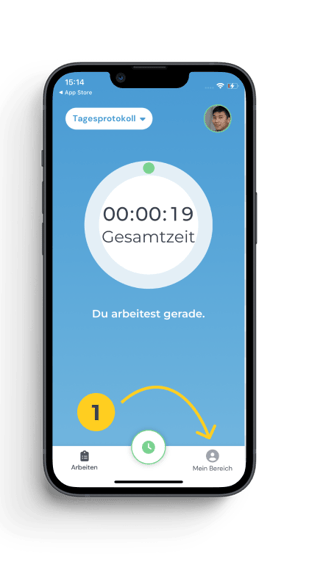
1. Open the clockin app on your smartphone and tap “My Account.”
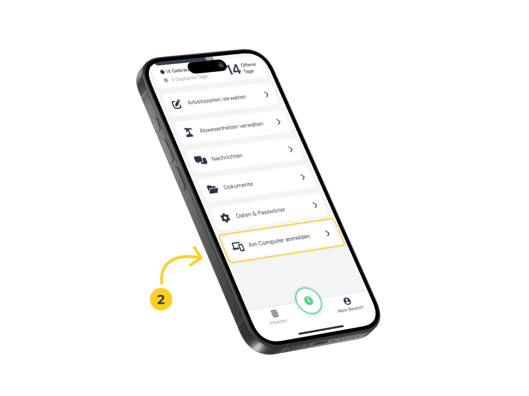
2. Scroll all the way down and click on “Log in on computer.”
Your smartphone’s camera will launch automatically — (you may need to grant camera access first)
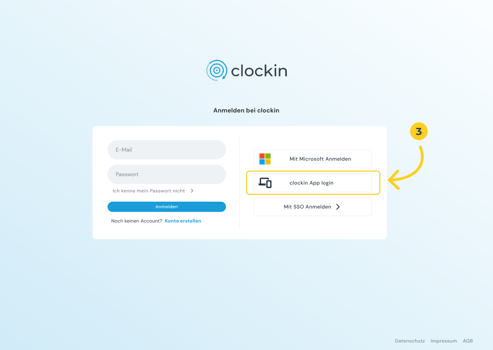
3. On your PC, go to office.clockin.de/login and click on “clockin App Login” on the login page.
A QR code will now appear on your PC. Hold your smartphone with the camera open in front of the screen and scan the code.
Du siehst keinen QR-Code? Lade die Seite neu und starte den Prozess erneut.
You’re logged in—done! 🎉